“If I didn’t receive a CP500, does that mean I don’t need to pay tax instalments?”The short answer: Not necessarily.
Even if you did not receive a physical CP500 notice, you may still be required to pay tax instalments. The safest way to confirm is by checking directly via LHDN’s MyTax portal.
In this guide, we explain what CP500 is, who should receive it, and—most importantly—how to check your CP500 amount via MyTax step by step.
What Is CP500?
CP500 (Notis Bayaran Ansuran) is a tax instalment notice issued by LHDN to individuals who earn non-salary income.
Unlike salaried employees whose tax is deducted monthly through PCB, CP500 applies to individuals who must pay tax in advance based on estimated annual income.
CP500 commonly applies to:
-
Sole proprietors & small business owners
-
Freelancers & gig workers
-
Property owners earning rental income
-
Commission-based professionals (insurance, real estate, finance agents)
-
Employees with side income (freelance, rental, commissions)
If you file Form B, CP500 is likely relevant to you.
Didn’t Receive CP500 — Does That Mean You Don’t Need to Pay?
No. Not receiving a CP500 letter does not mean you are exempt.
Reasons you may not receive CP500:
-
LHDN issues CP500 digitally via MyTax, not by post
-
Address or contact details are outdated
-
First-time business owners are unaware CP500 is auto-generated
-
CP500 exists but was never checked online
👉 The only reliable way to confirm is via MyTax.
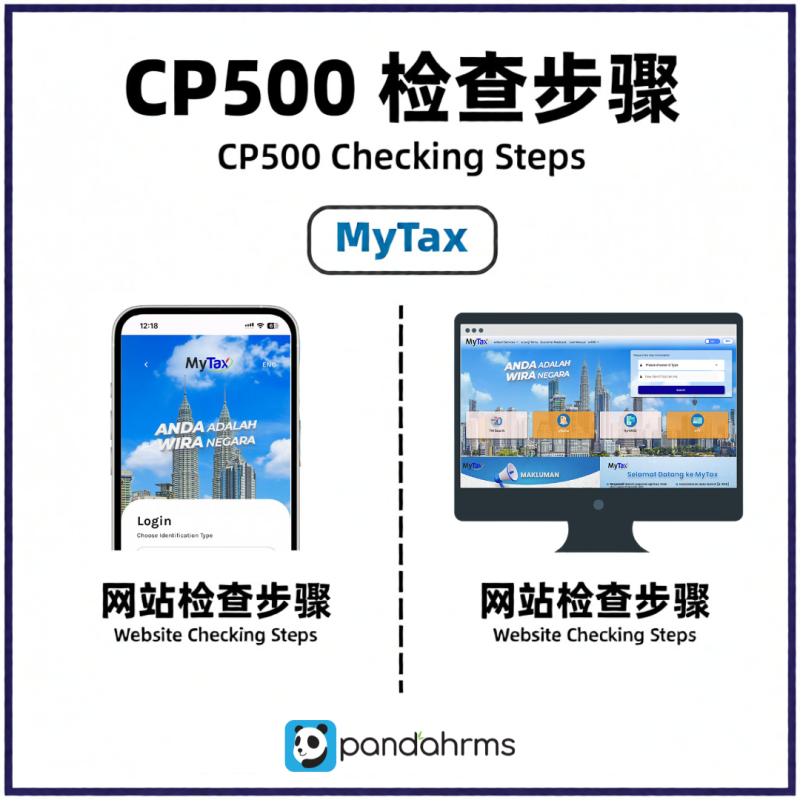
How to Check CP500 Amount Via MyTax (Step-by-Step)
All CP500 instalment details are displayed inside MyTax.
Step-by-Step Guide:
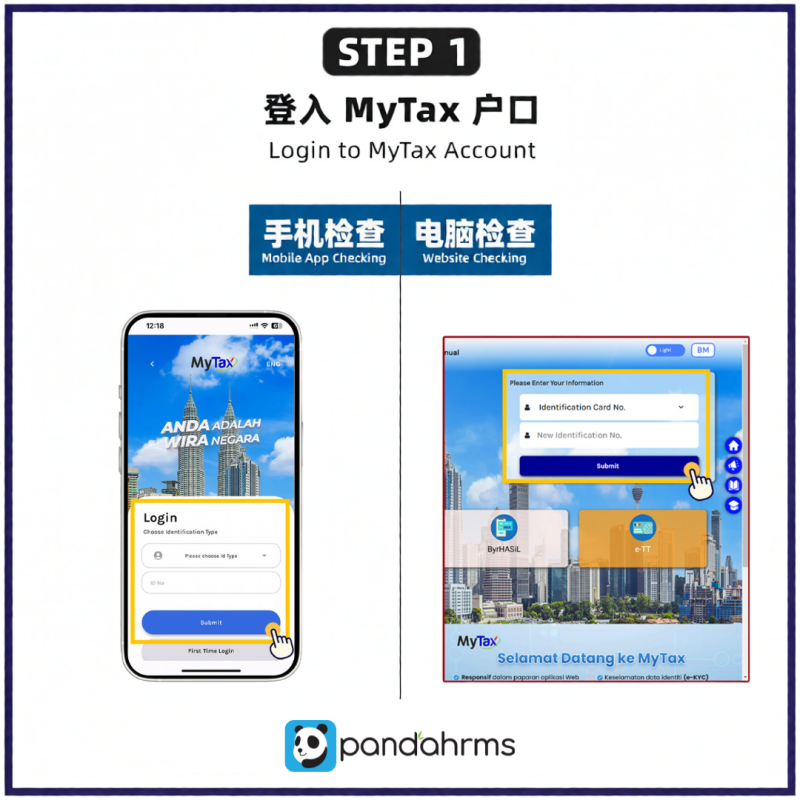
Step 1:
👉 Log in to MyTax
🔗 https://mytax.hasil.gov.my
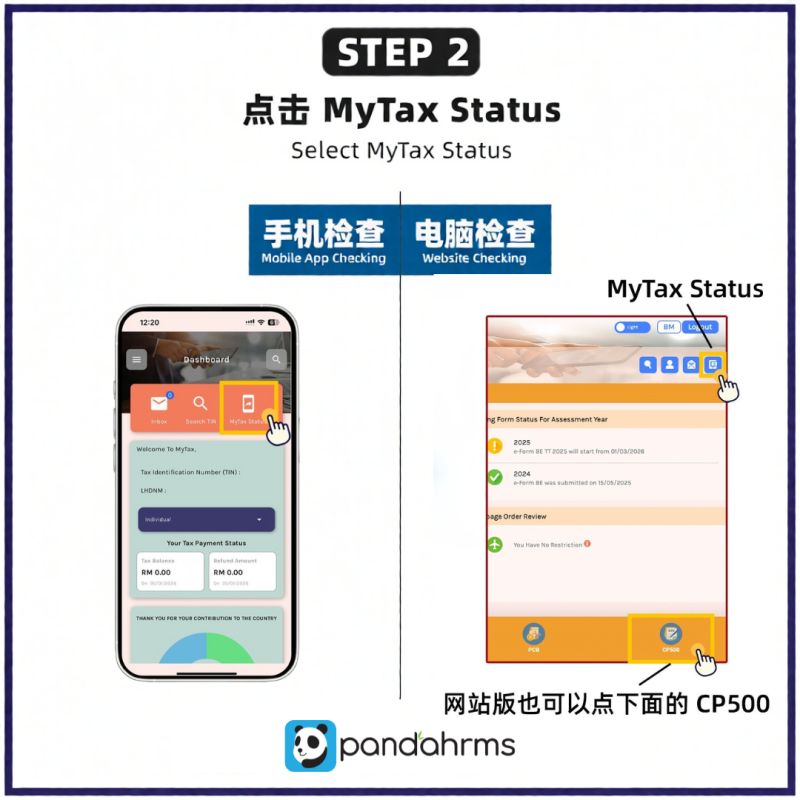
Step 2:
👉 Click “MyTax Status”
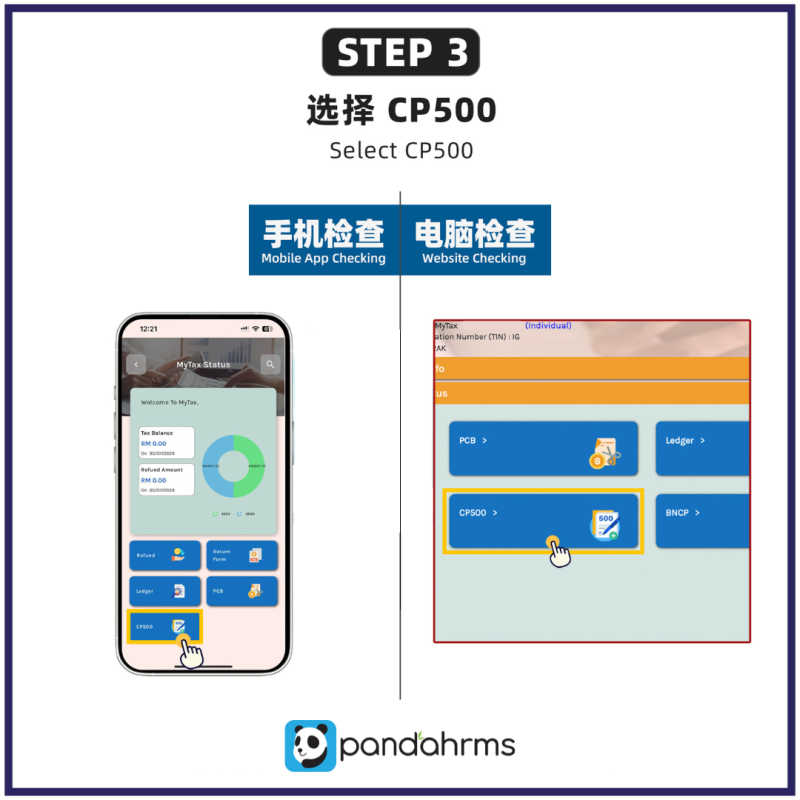
Step 3:
👉 Select CP500
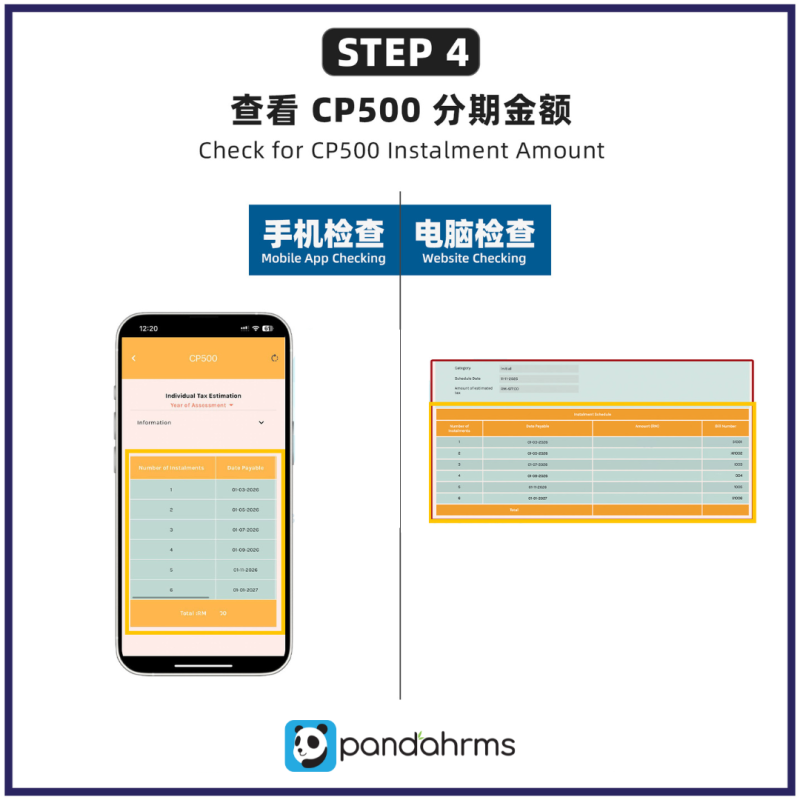
Step 4:
👉 View your CP500 instalment amount & payment schedule
If CP500 exists, all six instalments will be shown clearly.
💡 No CP500 displayed?
You may not be required to pay—but always reconfirm with LHDN if you have non-salary income.
How Often Do You Need to Pay CP500?
CP500 breaks your annual tax estimate into six instalments due every two months. Each instalment equals one-sixth of your estimated annual tax. You’ll usually receive your first notice in February or March, with the following payment schedule: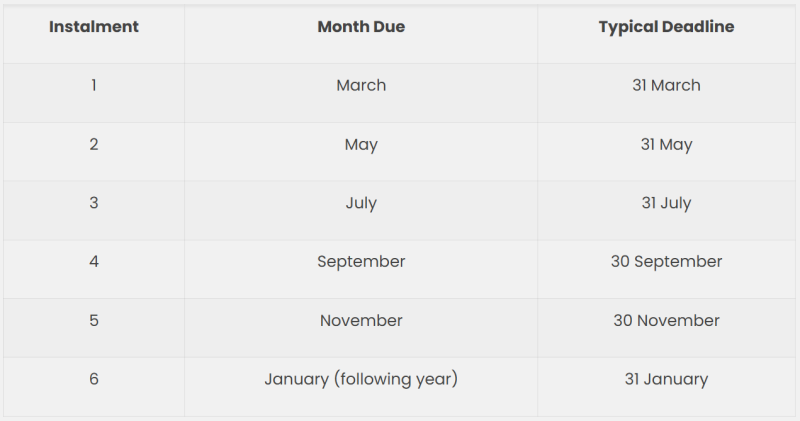
📌 Each instalment must be paid within 30 days
📌 Late payment triggers a 10% penalty
How to Pay CP500 (MyTax & ByrHASiL Options)
Once you see your CP500 in MyTax, payment is straightforward.
Option 1: Pay via MyTax
- Visit MyTax Portal.
- Log in with your identification number (IC/Passport).
- Go to e-Bayar → select CP500 – Bayaran Ansuran.
- Enter the payment amount and confirm via FPX banking.
Option 2: Pay via ByrHASiL
- Go to ByrHASiL portal.
- Choose CP500 payment type.
- Fill in your Tax Reference Number and IC.
- Complete payment through FPX or credit/debit card.
Other Options:
- Payment over the counter at POS Malaysia or LHDN branches.
- Appointed banks such as Maybank, CIMB, or Public Bank also accept CP500 payments.
How Is CP500 Calculated?
CP500 is based on your previous year’s Form B submission.
LHDN:
-
Estimates your annual tax
-
Divides it into six equal instalments
Example:
Freelancer
-
Declared taxable income: RM60,000
-
Tax payable: RM4,800
-
CP500: RM800 × 6 instalments
Rental Income
-
RM3,000/month × 12 = RM36,000
-
Estimated tax: RM1,560
-
CP500: RM260 × 6 instalments
Can You Adjust CP500 If the Amount Is Wrong?
Yes. This is done using Form CP502.
Taxpayers are allowed two adjustments:
-
First adjustment:
👉 Must be submitted by 30 June or 31 October -
Second adjustment:
👉 Must be submitted by 31 October
Adjustments are submitted via MyTax (CP502).
This helps:
-
Prevent overpayment
-
Improve cash flow
-
Avoid waiting months for refunds
What Happens If You Miss a CP500 Payment?
Missing a CP500 instalment:
-
Triggers 10% penalty after 30 days
-
Does not mean legal trouble—but act fast
What to do:
-
Pay immediately via MyTax or ByrHASiL
-
Check CP500 statement in MyTax
-
Keep payment receipts
Appeals may be considered for valid reasons (e.g. system errors).
Common CP500 Mistakes (And How to Avoid Them)
Most CP500 issues happen because taxpayers misunderstand how the system works, not because they’re careless. If you’ve ever thought or said something like the examples below, you’re not alone, but here’s how to fix them. 1. “I didn’t know I had to pay this, I already pay PCB at work.”- Many employees with side income think CP500 doesn’t apply to them. It does.
- Freelancing
- Commissions
- Property rental
2. “I didn’t realise there was a 30-day deadline.”
Each instalment must be settled within 30 days of the notice date. Missing it triggers a 10% penalty automatically. Add payment reminders to your phone calendar or MyTax alerts to stay ahead.3. “I selected the wrong payment code.”
When using FPX or online banking, always pick ‘CP500 – Bayaran Ansuran’ as the payment type. Selecting generic tax codes like “Cukai Pendapatan” or “CP204” can delay crediting and create reconciliation issues in MyTax.4. “My income dropped but I didn’t revise.”
If your income decreases, file Form CP502 immediately. Otherwise, you’ll overpay and wait months for a refund after filing Form B. Revising early helps preserve cash flow and prevents unnecessary over-contributions.5. “I didn’t keep any proof of payment.”
Audits or refund checks often require receipts. Always download the payment PDF or screenshot the confirmation page and store them in a folder labelled CP500 Payments 2025. Keep them for at least 7 years.Why CP500 Matters for Business Owners & Freelancers
CP500 helps:
-
Spread tax payments across the year
-
Avoid large lump-sum tax bills
-
Maintain a clean LHDN compliance record
However, it also requires proper tracking, reminders, and documentation—especially if you juggle payroll, claims, and business operations.
Final Takeaway
If you earn non-salary income, don’t assume silence means safety.
✔ Always log in to MyTax
✔ Check CP500 status regularly
✔ Pay on time or revise via CP502
✔ Keep records organised
Staying proactive prevents penalties, protects cash flow, and keeps your tax position clean.
This article is prepared for general guidance. For complex tax situations, consult a licensed tax agent or LHDN directly.