
Picture this:
It’s the 14th of the month, and you suddenly realise your company hasn’t submitted SOCSO contributions yet. You scramble to prepare payroll reports, double-check the rates, and rush the payment before the deadline. Stressful? Absolutely. And the worst part — late or incorrect SOCSO contributions can lead to penalties and delays in your employees’ claims.
This is why every employer in Malaysia needs to fully understand how SOCSO contributions work — from rates and categories to deadlines and compliance requirements. With a reliable HRMS like Pandahrms, the process becomes faster, more accurate, and much less stressful.
What is SOCSO Contribution?
The Social Security Organisation (SOCSO), or PERKESO, is a statutory body providing social security protection to Malaysian employees under the Employees’ Social Security Act 1969.
Employers must make monthly SOCSO contributions for all eligible employees, covering both the employer and employee portions. These contributions fund various benefits such as medical coverage, temporary and permanent disablement benefits, invalidity pensions, and dependants’ benefits.
SOCSO Contribution Categories & Rates (2024)
Category 1: Employment Injury Scheme & Invalidity Scheme
-
Applicable to: All Malaysian citizens and permanent residents
-
Contribution rate: Based on the contribution schedule from SOCSO
-
Paid by: Both employer and employee
Category 2: Employment Injury Scheme Only
-
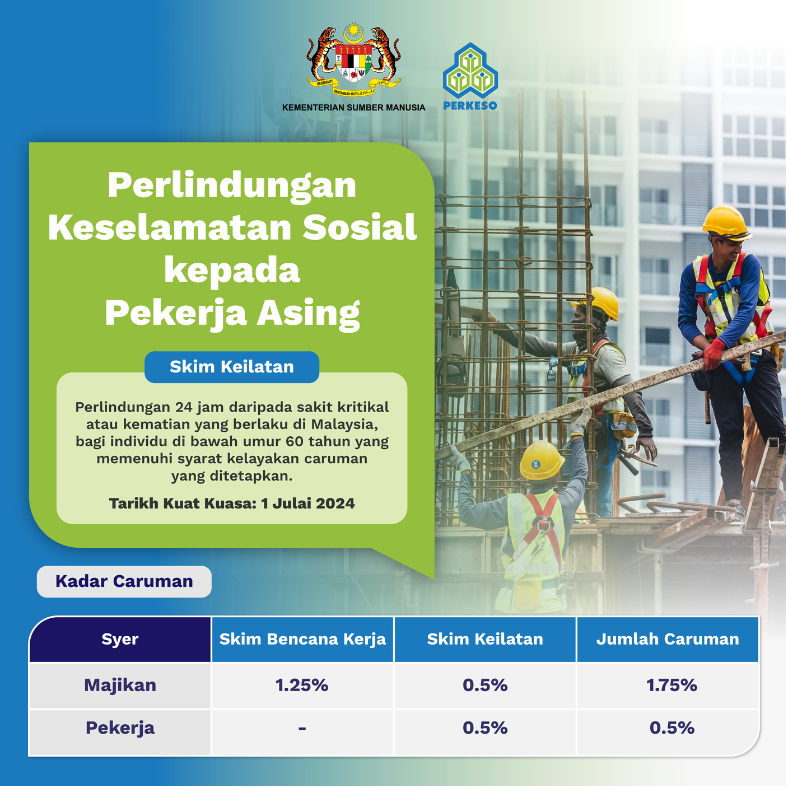
Applicable to: Foreign workers (except permanent residents)
-
Contribution rate: Employer’s contribution only
Note: Effective 1 July 2024, foreign workers (including expatriates) are required to contribute under Category 1, same as local workers. This means employers must pay 1.75% of monthly wages for the employer portion.
How Pandahrms helps: With Pandahrms, you can configure your payroll settings to automatically classify wage items according to SOCSO rules, ensuring every contribution is calculated accurately. This reduces the risk of underpayment, overpayment, or penalties from incorrect wage reporting.
When to Pay SOCSO Contributions
SOCSO contributions are due by the 15th of the following month.
Example:
-
Wages for January → Contributions must be paid by 15 February
Late payments may result in:
-
Penalty interest charges
-
Potential delays in employees’ SOCSO claims
How to Submit SOCSO Contributions
Employers can submit contributions online via the PERKESO Assist Portal:
-
Log in to the portal
-
Select the relevant contribution month
-
Upload the contribution file or enter employee details manually
-
Verify the amounts and rates
-
Make payment via FPX, bank transfer, or cheque
Employer Compliance Responsibilities
To stay compliant with SOCSO regulations, employers must:
-
Register all eligible employees with SOCSO upon hiring
-
Deduct employee contributions correctly from monthly salaries
-
Pay both employer and employee contributions before the deadline
-
Maintain accurate wage and contribution records for inspection
-
Report workplace accidents promptly for claim purposes
How Pandahrms Makes SOCSO Compliance Easy
Manual SOCSO processing can be time-consuming and prone to human error. With Pandahrms, you can:
✅ Automate SOCSO Calculations
-
System applies the correct contribution rate based on employee wages and category.
✅ Generate SOCSO Reports in One Click
-
Instantly create reports in formats compatible with the PERKESO Assist Portal.
✅ Track Payment Deadlines
-
Keep on top of the 15th-of-the-month deadline with automated reminders.
✅ Accurate Payroll Integration
-
Ensure deductions and contributions match exactly with payroll data.
✅ Centralised Employee Records
-
Store all wage, employment, and SOCSO data securely for future reference or audits.
Final Thoughts
SOCSO contributions may seem routine, but a single missed or incorrect payment can disrupt your employee’s ability to claim benefits when they need them most. For employers, getting SOCSO right isn’t just about avoiding penalties — it’s about ensuring your workforce is protected.
With Pandahrms, SOCSO compliance is no longer a monthly headache. From automatic calculations to instant report generation, everything you need is right at your fingertips.