Form E Submission in Malaysia: Key Requirements Employers Must Not Overlook
Each year, employers in Malaysia are required to submit Form E as part of their statutory tax obligations.
Despite this being a routine process, many companies still encounter issues such as incomplete submissions, incorrect employee data, or last-minute errors. These mistakes can lead to penalties, increased scrutiny, and unnecessary administrative burden for HR and payroll teams.
This guide provides a clear and structured explanation of how to submit Form E through the MyTax system, along with the key requirements employers must prepare in advance.
What Is Form E in Malaysia?
Form E is an annual employer declaration submitted to the Inland Revenue Board of Malaysia (LHDN).
It summarises the following information for the relevant year of assessment:
- Total employee remuneration
- Allowances and benefits
- Monthly Tax Deduction (PCB)
- Number of employees
All employers are required to submit Form E, including companies that did not employ any staff during the year.
Form E Deadline in Malaysia (2026)
The submission deadline for Form E is 30 April 2026.
This requirement applies to all employers, regardless of company size or industry.
Importance of Timely Submission
Failure to submit Form E on time or submitting inaccurate information may result in:
- Financial penalties
- Legal implications for company directors
- Increased likelihood of audit
Employers are advised to complete their submission at least one to two weeks before the deadline to minimise risk.
Requirements Before Submitting Form E
Proper preparation is essential to ensure a smooth and accurate submission.
1. CP8D File (Mandatory)
The CP8D file contains detailed employee information, including:
- Personal details
- Annual remuneration
- Statutory deductions
Form E submission is considered incomplete without CP8D.
2. EA Forms (Employee Statements)
Employers are required to prepare and distribute EA Forms to employees. These forms include:
- Total annual income
- Benefits and allowances
- Tax deductions
The information in EA Forms must be consistent with both CP8D and payroll records.
3. Accurate Payroll Records
Before submission, employers should ensure that:
- Payroll for the year has been finalised
- All income components such as bonuses, overtime, and allowances are included
- Figures are consistent across all statutory reports
Step-by-Step: How to Submit Form E via MyTax
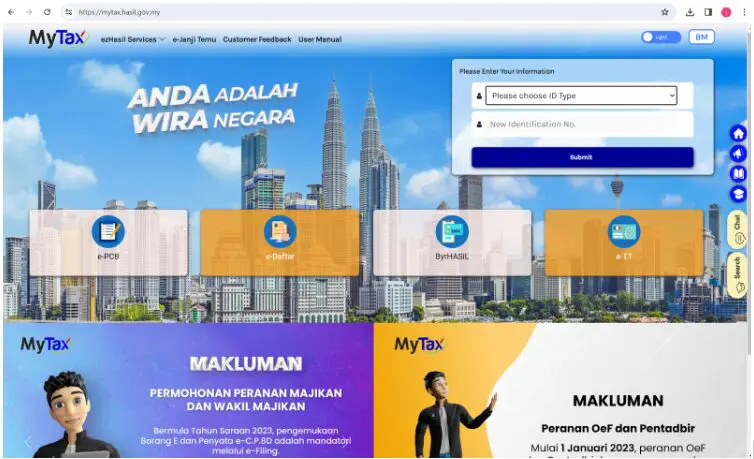
Employers can submit Form E through the MyTax portal by following the steps below.
Step 1: Log in to MyTax
- Access the MyTax portal
- Select identification type
- Enter login credentials
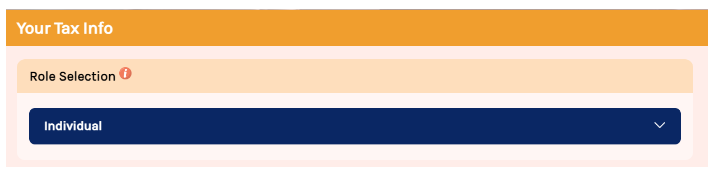
Step 2: Select Employer Role
Navigate to the role selection section and choose:
- Employer, or
- Employer Representative
Then select the relevant company.
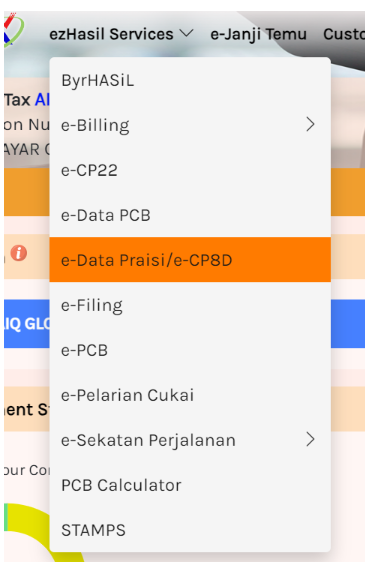
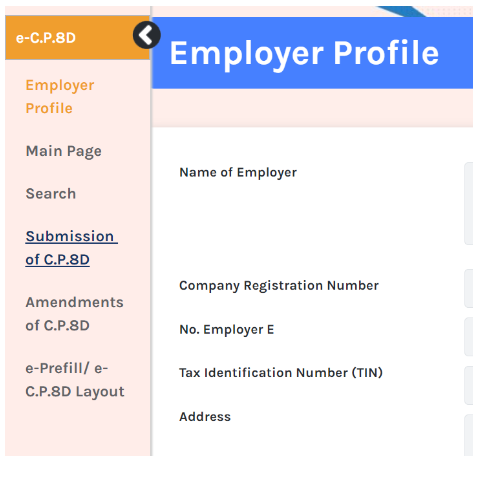
Step 3: Submit CP8D
Go to:
EzHasil Services → e-Data Praisi / e-CP8D
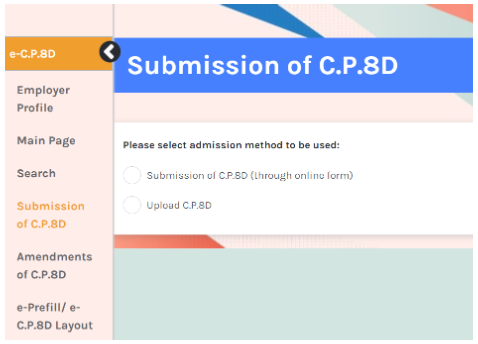
There are two submission methods:
Manual Entry
Enter employee data individually
File Upload (Recommended)
Upload the CP8D TXT file generated from your payroll system
File upload is generally more efficient and reduces the risk of manual errors.
Step 4: Review and Confirm CP8D
- Verify employee information
- Confirm and submit
- Download submission acknowledgement
Step 5: Submit Form E
Navigate to:
EzHasil Services → e-Filing → e-Form
Complete the required sections:
- Company information
- Employee details
- PCB summary
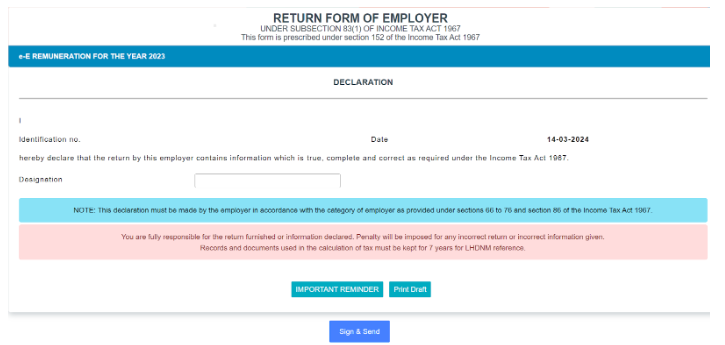
Step 6: Sign and Submit
- Enter designation
- Click “Sign and Send”
- Authenticate submission
Employers should download and retain the acknowledgement slip for record-keeping purposes.
Common Mistakes Employers Should Avoid
Employers frequently encounter the following issues during submission:
- Submitting Form E without CP8D
- Incorrect employee count due to unrecorded new hires or resignations
- Inconsistencies between payroll records, EA Forms, and CP8D
- Errors arising from manual data entry
- Last-minute submissions leading to rushed and inaccurate filings
Penalties for Non-Compliance
Failure to comply with Form E submission requirements may result in:
- Monetary penalties imposed by LHDN
- Legal consequences for company directors
- Increased audit exposure
Employers should treat Form E submission as a critical compliance obligation.
Why Payroll Software Improves Accuracy
Manual payroll preparation increases the likelihood of discrepancies, particularly when managing:
- Variable income such as bonuses and overtime
- Multiple employees
- Complex remuneration structures
A payroll system can support employers by:
- Generating CP8D files automatically
- Ensuring consistency across payroll reports
- Reducing manual errors
- Improving overall efficiency
How Pandahrms Supports Form E Preparation
Pandahrms provides an integrated approach to payroll and statutory reporting by enabling employers to:
- Generate CP8D files directly from payroll data
- Maintain accurate and centralised employee records
- Prepare consistent reports for Form E submission
- Reduce compliance risks associated with manual processing
This is particularly beneficial for organisations managing growing teams or complex payroll structures.
Conclusion
Form E submission is a statutory requirement that demands accuracy, consistency, and timely preparation.
To ensure compliance, employers should:
- Prepare CP8D in advance
- Verify payroll and employee data
- Follow the correct submission process
- Avoid last-minute filing
A structured approach to payroll and reporting will help reduce errors, improve efficiency, and minimise compliance risks.
Frequently Asked Questions (FAQs)
1. Who is required to submit Form E?
All employers in Malaysia, including companies without employees.
2. What is CP8D?
CP8D is a report detailing employee remuneration and statutory deductions submitted together with Form E.
3. Can Form E be submitted without CP8D?
No. CP8D is a mandatory component of Form E submission.
4. What is the deadline for Form E 2026?
The deadline is 30 April 2026.
5. How is Form E submitted?
Form E is submitted online through the MyTax portal using the e-Filing system.
6. What are the consequences of late submission?
Employers may face penalties, fines, or legal action.
7. Can payroll software assist with submission?
Yes. Payroll systems can automate CP8D preparation and improve overall accuracy.