Managing CP38 deductions is one of those payroll tasks that looks simple but carries high compliance risk if handled incorrectly.
CP38 involves additional monthly tax deductions ordered by LHDN, and employers are legally responsible for:
-
deducting the exact amount
-
paying it on time
-
and keeping proper records for audit purposes
This guide explains what CP38 is, how to pay CP38 via MyTax step by step, and how employers can manage CP38 efficiently within their payroll process—especially as enforcement becomes more digital in 2026.
What Is CP38?
CP38 is an additional tax deduction instruction issued by LHDN when an employee has outstanding or underpaid income tax.
Once a CP38 notice is issued:
-
The employer must deduct a fixed extra amount from the employee’s salary
-
The deduction is in addition to normal PCB (MTD)
-
The employer must remit CP38 to LHDN every month
Key CP38 Facts for Employers
-
CP38 only applies when LHDN issues a formal directive
-
The amount and duration are fixed by LHDN
-
Employers cannot adjust, reduce, or stop CP38 on their own
-
CP38 helps employees settle tax arrears by instalments, instead of a lump sum
Once received, CP38 is not optional. It is a statutory employer obligation.
What Employers Need Before Paying CP38
Before logging in to MyTax, HR and payroll teams should prepare the following:
1. Official CP38 Instruction from LHDN
The CP38 notice typically states:
-
Employee name
-
Tax reference number
-
Total outstanding tax
-
Monthly CP38 deduction amount
-
Deduction duration
2. Employee Details
-
Full name
-
IC number / passport number (for non-citizens)
3. Monthly CP38 Amount
-
Must exactly match the amount stated in the CP38 notice
4. Employer MyTax Access
-
Employer income tax number
-
Digital certificate / MyTax login credentials
Having these ready reduces input errors, which are a common cause of CP38 reconciliation issues.
How to Pay CP38 via MyTax (Step-by-Step)
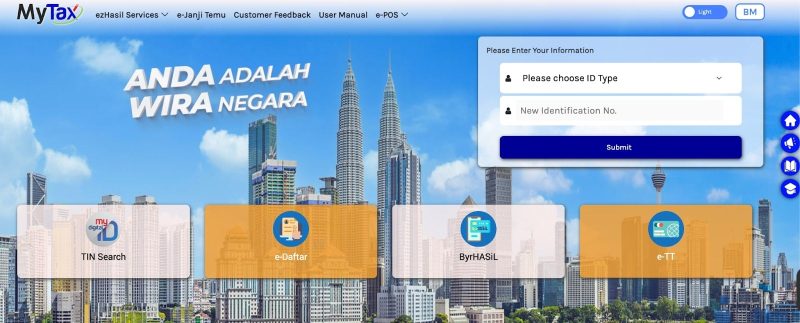
Step 1: Log In to MyTax
-
Visit the MyTax portal
-
Log in using employer credentials
-
Ensure you are using the employer profile, not an individual taxpayer login
Step 2: Access the PCB / CP38 Module
-
From the dashboard, go to Services or ezHasil Services
-
Select the e-PCB / e-CP39 / e-Data PCB module
-
Locate the PCB / CP38 payment section
MyTax groups PCB and CP38 together for submission and payment.
Step 3: Select Month and Enter CP38 Details
-
Choose the Year of Assessment (YA) and payment month
-
Enter:
-
Employee tax reference / IC
-
Employee name
-
CP38 amount (as per LHDN notice)
-
If you manage multiple employees with CP38:
-
Repeat the process for each employee, or
-
Upload a CP39 / CP38 file generated by your payroll system via e-Data PCB
Step 4: Review CP38 Summary Carefully
MyTax will display:
-
Total PCB
-
Total CP38
-
Combined payment amount
Before proceeding:
-
Confirm employee names and IC numbers
-
Ensure CP38 amounts match LHDN instructions
-
Correct any errors immediately
This step is crucial to avoid post-submission amendments.
Step 5: Make Payment
Choose a payment method such as:
-
FPX online banking (Maybank, CIMB, Public Bank, etc.)
-
ByrHASiL
-
Other methods supported by LHDN
Complete the transaction and wait for the successful payment confirmation.
Step 6: Download and Keep the Receipt
After payment:
-
Download the e-receipt
-
Save it with your payroll records
-
Record:
-
Month and year
-
PCB amount
-
CP38 amount
-
Transaction reference number
-
These documents are essential for:
-
LHDN audits
-
Employee queries
-
Internal payroll reconciliation
Common CP38 Compliance Tips for HR & Payroll
Follow LHDN Instructions Exactly
Never:
-
Change the CP38 amount
-
Stop deductions early
-
Extend the deduction period
Only LHDN can revise CP38 instructions.
Record CP38 Separately from PCB
Even if paid together via MyTax:
-
CP38 should appear as a separate line item in payroll records and payslips
-
This improves clarity and audit readiness
Pay CP38 by the Deadline
-
CP38 must be remitted by the 15th of the following month
-
Late payment may result in:
-
Penalties
-
Employer liability
-
Compliance red flags during audits
-
Communicate Clearly with Employees
Inform affected employees:
-
Why CP38 applies
-
Monthly deduction amount
-
Duration of deduction
Clear communication helps reduce payroll disputes.
FAQs About CP38
1. Is CP38 compulsory?
Yes. Once LHDN issues a CP38 notice for an employee, employers are legally required to deduct the stated amount and remit it to LHDN every month, based on the instructed schedule.
This deduction is not optional and must be processed together with monthly payroll.
2. Where can employers find CP38 notices?
CP38 instructions are typically:
-
Issued as official letters from LHDN to the employer; and/or
-
Accessible via the company’s LHDN / MyTax account, if available
Best practice for HR teams:
-
✔️ Maintain a central CP38 tracker or file
-
✔️ List all employees with active CP38 orders
-
✔️ Monitor start dates, amounts, and status consistently
3. Can employers change or reduce the CP38 amount?
No. Employers are not allowed to amend CP38 amounts on their own.
If an employee feels the instalment is too high, they must:
-
Contact LHDN directly to request a review or adjustment
Any change is only valid after LHDN issues a new CP38 instruction.
4. What happens if CP38 is not paid on time?
Late or missing CP38 payments can lead to:
-
Penalties and fines
-
Potential legal action against the employer
-
Compliance risks during an LHDN audit
That’s why CP38 should be managed alongside PCB as part of a structured monthly payroll process.
5. Can CP38 and PCB be paid together in one payment?
Yes, operationally, PCB and CP38 are commonly submitted via MyTax / e-CP39 and paid together in one FPX transaction.
However, for proper payroll control and audit readiness, employers should ensure that PCB and CP38 are clearly separated in internal records and CP39 summaries, including:
-
✔️ Total PCB amount
-
✔️ Total CP38 amount
Clear separation simplifies reconciliation, reduces errors, and provides clarity during audits or disputes.
How Pandahrms Helps Employers Manage CP38 Accurately
Managing CP38 manually increases the risk of:
-
Wrong deduction amounts
-
Missed deadlines
-
Payroll inconsistencies
-
Audit complications
Pandahrms simplifies CP38 compliance by integrating CP38 directly into your payroll workflow.
With Pandahrms, employers can:
-
Record CP38 as a separate statutory deduction
-
Automatically calculate payroll with PCB + CP38 together
-
Generate accurate CP39 and statutory summaries
-
Reduce manual key-in errors
-
Maintain organised records for LHDN audits
As LHDN enforcement becomes increasingly data-driven, having a payroll system that handles CP38 correctly is no longer optional—it is a compliance necessity.
Final Reminder for Employers
CP38 is not just an HR task.
It is a legal obligation with direct employer liability.
A missed deduction or late payment can expose your company to:
-
Financial penalties
-
Audit risk
-
Loss of trust with employees
Preparing early, following MyTax procedures carefully, and using a structured payroll system are the best ways to stay compliant in 2026.