v26.8.0Attachment Object-Store support
RELEASED9 August 2026|5 new · 5 improved · 20 fixed
New
- Added an Approval History screen to the mobile app, so approvers can review the applications they have already approved or rejected, sorted by employee ID or name.
- Added a check to the Approval Route listing that shows employees who are not mapped to any approval route group, so nobody is left out of an approval flow.
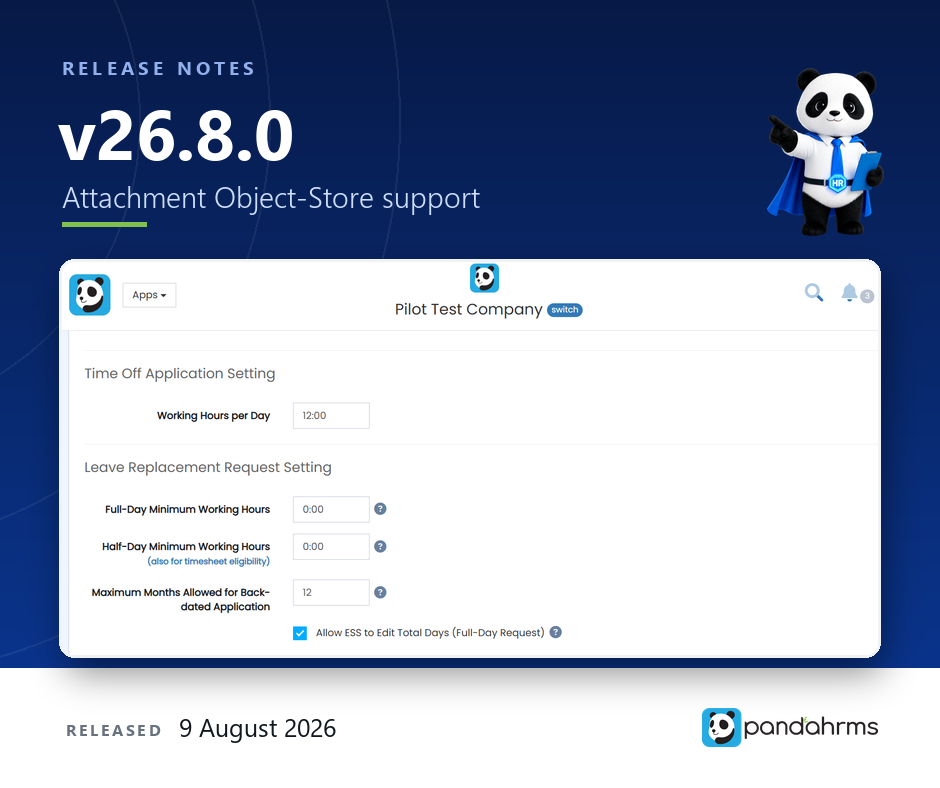
- Added an Allow ESS to Edit Total Days (Full-Day Request) setting to the Leave Replacement Request settings. With it switched on, employees can request 1.5 or 2.0 days of replacement leave in a single application — for example after 12 hours of overtime in one day. Admins are not restricted by this setting, and the maximum is 2.0 days per request.
- Added S3 object storage as an option for attachments, alongside the existing server folder, FTP and SFTP. Each system chooses its storage method in the Upload Path Setting page.
- Added a Last Approved Date column to the Overtime, Outstation, Time Off, Leave, Employee Leave, Claim, ESOS Option Exercise and Training Class Application lists, so the approval date is visible without opening each record. The Overtime list also shows who submitted the application and when. The column stays blank until an application is approved. Group Leave Application is not included, because those are approved as individual leave applications.
Improved
- Changed claim approval so that once an item is rejected at any level, later approval levels can no longer approve or reject that item. Rejected items stay final.
- Opened the Timelog Transaction Report and the Time Log Report to approvers, on both web and the mobile app.
- Claim status emails now show the claim’s detail lines instead of only the header summary, whichever platform the approval was made on. To include the rejection reason for rejected items, switch on Show Reject Reason in Claim Email Notification in the Claim System Parameter.
- The Overtime Application Listing now carries Applied By, Applied Date, Last Approved By and Last Approved Date. On the printout and the Excel export the two dates appear as their own columns, and stay blank until the application is approved.
- Uploaded files now record their type, size, fingerprint and storage location, which makes attachments easier to verify and to move between storage systems.
Fixed
- Fixed payslips failing with a file error when the employee’s assigned payslip format had no report template. The screen now explains what to do — employees are told to contact HR, and admins can correct the affected employees in bulk from the payroll dashboard.
- Fixed payslips emailed to one employee at a time producing a PDF that could not be opened. Both the bulk and the per-employee path now generate the payslip record before sending. Payslips already sent before this release need to be posted again.
- Fixed an employee group appearing twice in the employee profile when the employee held a duplicate membership record. Each group now appears once, and duplicates are prevented from being created again.
- Fixed an approved leave disappearing from the timesheet and the Leave Application Listing after a partial cancellation. Cancelling now runs as a single step that rolls back if anything fails, and cancelling the same day twice is rejected instead of creating a duplicate record.
- Fixed an employee ID staying reserved after the profile holding it was deleted. Deleting an employee now deactivates every account linked to them, and a username or login identifier counts as taken only while a live account is using it.
- Fixed System Parameter refusing to save more than one HR General Email. Comma-separated addresses are now accepted.
- Fixed cancellation and withdrawal notification emails showing the raw text {MODULE} instead of the module name.
- Fixed long geofence and Weak GPS location names being cut off on the mobile clock-in screen. Names now wrap in full, and the list can be searched by typing.
- Fixed News attachments being pushed out of view on the mobile app. The detail screen now scrolls, and a “With attachment(s)” marker appears above the message.
- Fixed the iPhone and iPad app failing to reach a Pandahrms server hosted on the company’s own network. The app now asks once for local network permission and explains why, and the setup screen reports what the server actually replied instead of a generic connection error.
- Fixed the iOS app closing completely when an employee captured the verification photo during attendance clock-in.
- Fixed the time not being selectable when applying for overtime on iPhone — the picker stayed on the same time.
- Fixed the receipt date of a draft claim item not being editable in the mobile app.
- Fixed the attendance incentive being reset to zero when an employee was transferred to another company on the last day of a cut-off period they had worked in full.
- Fixed the AutoPay Generator ignoring the selected Division and Company Branch filters when generating statutory files.
- Fixed the UOB Bulk Payment file leaving the ID Number and Beneficiary ID blank for foreign workers. The passport number is now used.
- Fixed External Transfer In with “Link to existing employee profile” not carrying over the employee’s personal, bank and statutory details. Company-specific items stay with the receiving company.
- Fixed the public holiday timesheet picking up a work schedule belonging to another company when two companies used the same schedule name.
- Fixed uploaded files being left behind in storage when the attachment record could not be saved. The file is now removed automatically and a clear error is shown.
- Fixed some employees not appearing in the employee list of the Staff Calendar.