v26.10.0October 2026 release
RELEASED5 October 2026|8 new · 5 improved · 13 fixed
New
- Approved salary adjustments, allowances and bonuses from a completed recommendation cycle in Performance can now be imported straight into HCM Payroll, instead of being keyed in a second time. One of the entry points is HR > Salary Adjustment > Import from Performance.
- Added a User Access Rights page in Settings, which shows what each access template can reach and can be exported.
- Added a Refresh Timelog button to the Time Log and Time Log Transaction reports. One action refreshes every employee the report’s filter selects, after a confirmation, and moves only unmatched punches inside the report’s dates.
- Added an Attachment column to the Claim Application Report. A claim line with a receipt shows a View link that opens the file; a line without one shows N/A.
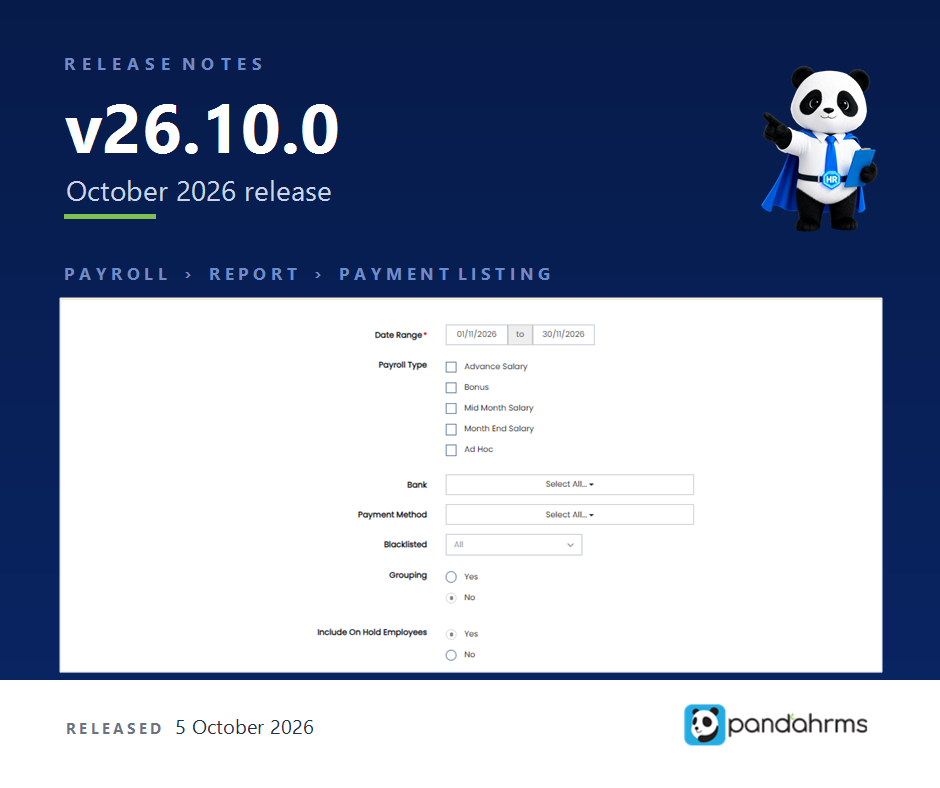
- Added an Include On Hold Employees filter to the Payment Listing, so the report can be reconciled against the bank file, which already leaves out employees whose payroll status is On Hold. It defaults to Yes, so existing output is unchanged.
- Added Confirmation Date and Division columns to the Birthday Listing, included in the Excel export. Employees with no division or confirmation date still appear in the list.
- Added an Auto-Generated Card Number Format option to System Parameter — follow ClientID_UserID, which is the existing behaviour, or follow the employee number. It is set per company and appears when Auto-Generate Card Number on Profile Creation is switched on.
- Added the RHB REFLEX SOCSO file layout (August 2026) to the AutoPay Generator, with the IC number, the employee’s SOCSO number and the salary in their own columns, and the SKBBK amount in its own column instead of being combined into the SOCSO contribution.
Improved
- The Statutory Listing Report now groups by Department or Division from a single Group By option, with a Show Group Total only choice. Employees without a division are listed under (No Division).
- The dashboard’s unsent-email reminder now counts only emails queued in the last seven days, instead of every unsent email ever queued.
- Tightened three remaining checks on the Express Entry and Exceeded Overtime screens, following an internal security review.
- Resolved duplicate custom reports in the Attendance module, where two reports carried the same name.
- When a new passport is imported for an employee through Data Management, the previous passport record is now set to not eligible automatically, so only the current passport stays active.
Fixed
- Fixed External Transfer In losing an employee’s Confirmation Date and Service Effective Date when Continue Service was ticked, so probation status and length of service now carry across. Employee groups also stay inside the receiving company.
- Fixed claim attachments that could not be opened. Attachments were sharing one stored file between records, so removing one claim’s file took it away from the others.
- Fixed One-on-One sessions staying at Acknowledged and never completing when a participant had no email address. Completing a session no longer depends on the notification email going out.
- Fixed the Employee Profile import rejecting a duplicate NRIC even when Allow Duplicate NRIC in the Same Company was switched on — the import was not reading that setting.
- Fixed a Form Designer checkbox question set to Required with a maximum number of selections: the form refused to submit even after the maximum allowed options had been ticked.
- Fixed an Error 500 when generating the Employee Confirmation Report. Report conversions shared one background process, so a conversion could be dropped without any error being raised.
- Fixed Salary Adjustment, ESOS Plan Award and Plan Vesting, and document template actions not checking that a record belongs to the company the user is working in.
- Fixed the Payment Listing leaving the Account Number blank after an employee’s payment method changed. The report now reads the account from the field that matches the method in use.
- Fixed the figures on the last page of the Payroll Ledger overlapping when the report was saved to PDF. The end-of-report summary is now kept clear of page breaks, the same way the employee rows already were.
- Fixed the Time Off Application Report listing transactions out of order; rows now come back in a fixed sequence.
- Fixed some employees’ passport details not being saved when profiles were updated through Data Management → Import Profile.
- Fixed LHDN submissions still using an employee’s old passport number after the passport had been updated; the current passport is now used.
- Fixed notification emails addressed to more than one recipient not being sent. Multiple addresses in the To field are now sent separately, the way CC addresses already were.