Quick answer: A Malaysian employee opts out of Lindung 24 Jam by filing the Notis Pelepasan Liabiliti release form through the PERKESO LINDUNG Faedah Portal (or at any PERKESO counter) before the opt-out deadline. Foreign workers cannot opt out. This guide walks employers through the exact form, the steps, and what changes on the payslip afterwards.
What is Lindung 24 Jam (and the SKBBK deduction)?
Lindung 24 Jam is PERKESO’s 24-hour protection scheme. It extends SOCSO coverage beyond working hours to accidents that happen outside the course of employment — on the way to a football game, at home, anywhere, any time. The extra protection is funded by the SKBBK contribution of 0.75%, which took effect on 1 June 2026 and is fully borne by the employee.
Because it is a new deduction on the payslip, some employees ask to opt out. Under the current rules that choice is available — but only to a specific group, only through one official channel, and only before the deadline.
Who can opt out — and who cannot
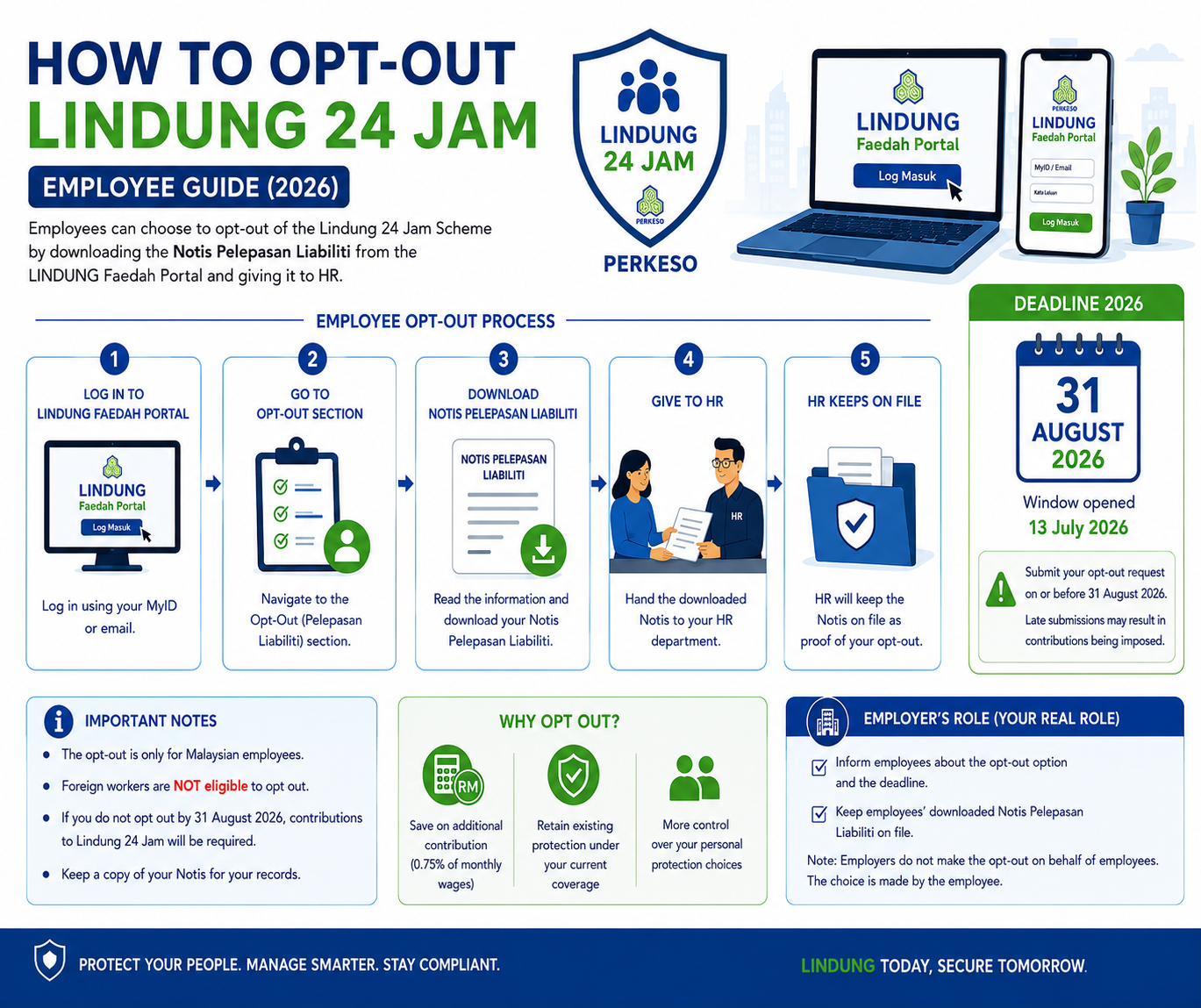
- Malaysian employees — may choose to opt out.
- Foreign workers — cannot opt out; participation stays mandatory.
As the employer, you do not opt staff out on their behalf. The decision and the form belong to the individual employee. Your role is to inform your team the option exists, point them to the correct portal, and update payroll once an opt-out is confirmed.
The exact form you need
The official document is the Notis Pelepasan Liabiliti Skim Lindung 24 Jam (Liability Release Notice), sometimes shown as Perakuan Pelepasan Liabiliti. There is no separate downloadable PDF to email in — the declaration is completed inside the PERKESO portal itself.
Step-by-step: how an employee opts out
Option A — Online (recommended)
- Go to the LINDUNG Faedah Portal: https://lindungfaedah.perkeso.gov.my/auth/
- Log in with the employee’s own credentials.
- Open the Lindung 24 Jam opt-out / liability-release declaration.
- Read and acknowledge that non-work accident coverage ends for the opted-out period.
- Submit the declaration.
- Download the confirmation/status document and keep a copy for HR records.
Option B — In person
The employee can complete the same release at any PERKESO (SOCSO) counter, bringing their MyKad.
The deadline
The opt-out window is not open indefinitely. Based on the latest guidance the cut-off is 31 August 2026 — after that date, opting out is no longer possible and the 0.75% continues. Deadlines for this scheme have been revised more than once, so confirm the current date on the official PERKESO channel before you advise staff.
What happens after opting out
- The 0.75% SKBBK deduction stops on the employee’s payslip.
- The employee loses Lindung 24 Jam protection for eligible non-employment accidents during the opted-out period.
- Normal SOCSO employment-injury and invalidity coverage during working hours is unaffected.
Should you encourage staff to opt out? (An honest employer view)
It is the employee’s money and the employee’s decision, so the fair approach is to give the facts, not a push. For 0.75% of monthly wages, an employee gets round-the-clock accident and disability protection for their family. For most people that is a small price for real cover. The staff most likely to opt out are those already carrying strong personal accident insurance. Lay out both sides and let each person choose before the deadline.
Keep your payroll correct either way
Whether an employee stays in or opts out, your payroll has to reflect it correctly from the right month — or you risk under- or over-deducting SOCSO. Pandahrms calculates SOCSO, EIS and the SKBBK Lindung 24 Jam deduction automatically for every employee, and lets you switch an individual’s SKBBK status the moment their opt-out is confirmed, so the payslip is always right.
See how Pandahrms handles SOCSO & Lindung 24 Jam in payroll →
This article is general information, not legal or compliance advice. Confirm the current opt-out deadline and scheme rules on the official PERKESO website before acting.